

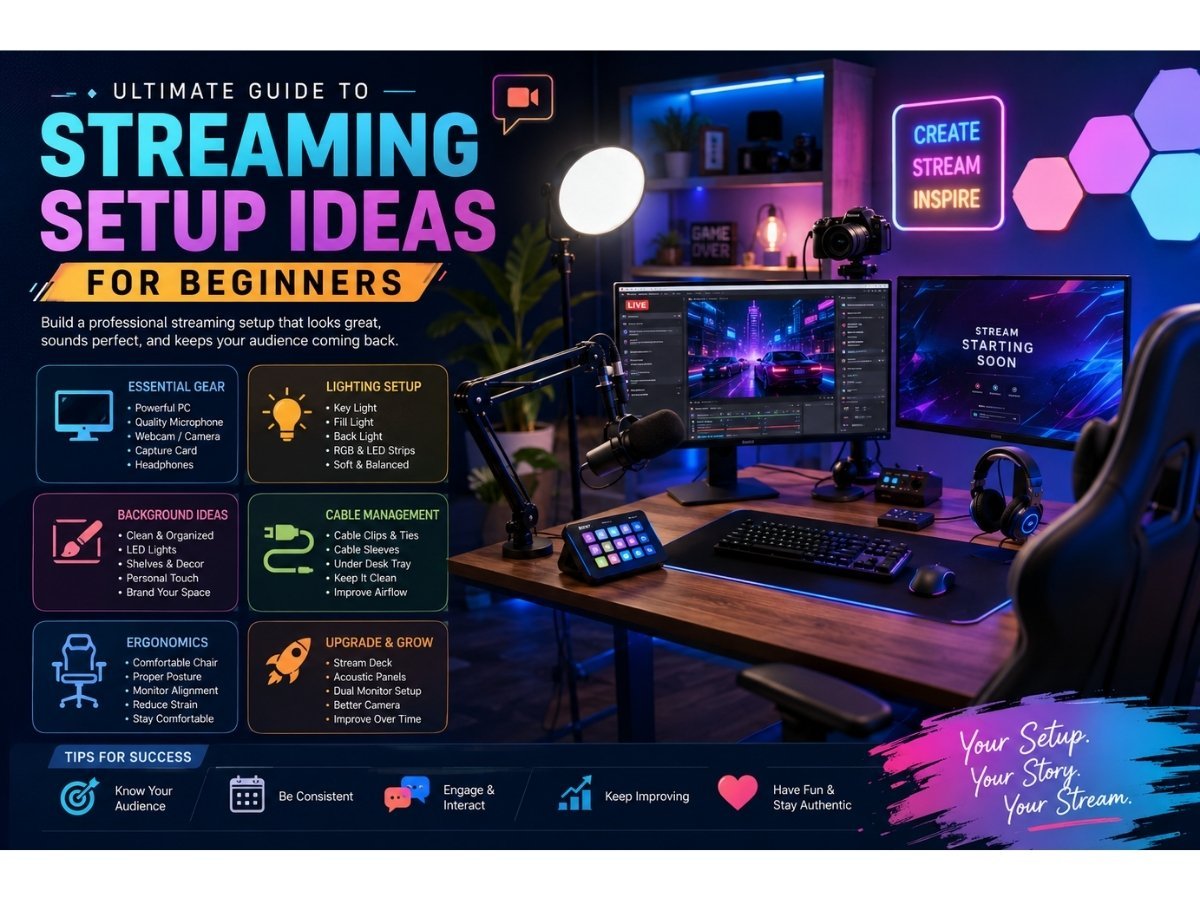
Starting a streaming channel requires more than just hitting a “go live” button. The visual and audio quality of your broadcast plays a massive role in attracting and retaining viewers. When someone clicks on your stream, they decide within seconds if they want to stay. A clean, professional-looking environment shows your audience that you take your content seriously.
Building the perfect environment can feel overwhelming when you look at top creators with massive budgets. You might see walls of monitors, professional studio lighting, and expensive soundproofing. But you do not need to spend thousands of dollars to create an engaging space. A thoughtful approach to your layout, lighting, and basic gear will elevate your broadcast immediately.
This guide covers practical streaming setup ideas to help you build a professional space. We will cover the essential gear, lighting techniques, background design, and cable management. By the end of this post, you will have a clear blueprint for assembling a stream room that looks great and keeps you comfortable during long sessions.
Table of Contents
Essential Gear for Your Streaming Setup
Your hardware forms the foundation of your broadcast. You need equipment that can handle the heavy processing load of encoding video while simultaneously running games or software.
Choosing the Right Computer
Your PC or Mac is the brain of your operation. Streaming demands significant processing power. A strong CPU handles the heavy lifting of video encoding, while a capable GPU ensures smooth visuals. Many creators eventually move to a dual-PC setup, using one computer for gaming and a dedicated second machine for streaming. However, a single modern PC with a multi-core processor and plenty of RAM (at least 16GB, though 32GB is preferred) works perfectly for most beginners.
Microphones for Clear Audio
Viewers will forgive average video quality, but they will leave immediately if your audio is poor. A dedicated microphone is non-negotiable. USB microphones like the Blue Yeti or Elgato Wave offer great plug-and-play functionality. If you want to take your audio a step further, look into XLR microphones paired with an audio interface. Dynamic microphones are particularly excellent for streamers because they reject background noise, keeping the focus entirely on your voice rather than the hum of your computer fans or the click of your keyboard.
Webcams and Cameras
Your camera connects you to your audience. A standard 1080p webcam from brands like Logitech provides a great starting point. As your channel grows, you might consider upgrading to a mirrorless camera connected via a capture card. This provides that beautiful, blurred background effect (bokeh) and superior low-light performance. Remember to mount your camera at eye level. Looking slightly down or up at the lens creates an awkward viewing angle for your audience.
Lighting and Background Ideas
Great equipment cannot fix bad lighting. Proper illumination transforms a cheap webcam into a highly capable camera, while a poorly lit room will make even a thousand-dollar lens look grainy and cheap.
Key Lighting Techniques
The most popular lighting technique for streamers is the three-point lighting system. You place a main light (key light) in front of you, slightly off to one side. A secondary light (fill light) sits on the opposite side to soften shadows on your face. Finally, a backlight positioned behind you separates you from the background, adding depth to your shot.
Ring lights are a popular, budget-friendly option that provide even illumination across your face. LED panels give you more control over color temperature and brightness. Position your lights so they do not reflect off your glasses or monitor, which can distract your viewers.
Creating a Captivating Background
Your background acts as your digital set. It should reflect your personality and brand without being overly cluttered. Many streamers use smart LED strips or RGB panels to wash their back walls in vibrant colors.
Consider adding floating shelves to display items that matter to you. Collectibles, plants, vinyl records, or books give viewers insight into your interests and spark conversations in chat. Keep the space behind you tidy. A messy room suggests a lack of professionalism and pulls attention away from your content.
Cable Management and Ergonomics
A beautiful background means very little if your desk is a tangled mess of wires. Furthermore, spending hours at a desk requires a setup that supports your physical health.
Keeping Cables Tidy
Cable management takes patience but delivers massive aesthetic rewards. Start by routing all your power cables along the legs of your desk using zip ties or velcro straps. Install a cable management tray under your desk to hold power strips and excess wire lengths. Use cable sleeves to bundle cords that travel the same path, such as your monitor and power cables. A clean desk surface gives you more room to move your mouse and reduces mental clutter while you broadcast.
Comfortable Seating and Desk Alignment
Long streams take a toll on your back and neck. Invest in an ergonomic chair that provides proper lumbar support. Position your monitors so the top third of the screen is at eye level, preventing you from hunching forward. Your keyboard and mouse should sit at a height where your elbows rest at a 90-degree angle. Some creators use height-adjustable standing desks, allowing them to shift positions during long broadcasts and keep their energy levels high.
Advanced Streaming Setup Upgrades
Once you have the basics dialed in, you can start looking at specialized tools to make your production smoother and more interactive.
Stream Decks and Controllers
A stream deck is a customizable control pad that lets you switch scenes, trigger sound effects, or send automated chat messages with the push of a button. It eliminates the need to awkwardly tab out of your game to manage your broadcasting software. You can program complex multi-step actions into a single key press, making your live production look incredibly smooth and professional.
Acoustic Treatment
If your room has hard floors and bare walls, your microphone will pick up noticeable echoes. Acoustic foam panels absorb these sound waves, creating a warmer, more intimate audio experience. You do not need to cover every inch of your walls. Placing panels strategically behind your monitors and on the walls immediately to your left and right will dramatically reduce room reverb. A thick rug under your desk also helps absorb sound bouncing off the floor.
Frequently Asked Questions (FAQ)
How much does a basic streaming setup cost?
A functional beginner setup usually costs between $200 and $500, assuming you already own a capable computer. This budget covers a reliable USB microphone, a 1080p webcam, and a basic LED lighting kit. You can always upgrade individual components as your channel grows.
Do I need a dual-monitor setup?
While you can stream with a single monitor, two monitors make the process significantly easier. You can play your game full-screen on your primary monitor while keeping your broadcasting software, chat window, and stream alerts visible on the second screen.
What internet speed is required for streaming?
Your upload speed matters most for streaming. For a stable 1080p stream at 60 frames per second, you need a consistent upload speed of at least 10 Mbps. Always connect your computer to your router using an Ethernet cable rather than relying on Wi-Fi, as hardwired connections prevent dropped frames and stream lag.
Is a green screen necessary?
No, a green screen is completely optional. Some creators prefer removing their background entirely to show more of the game screen. Others prefer having a physical background to show off their personality. Choose the style that best fits your brand.
Ready to Go Live?
Building your ideal broadcasting space is an ongoing process. You will constantly tweak your camera angles, adjust your lighting, and reorganize your desk as you discover what works best for your specific workflow. Start with the essentials: a clear microphone, a decent camera, and good lighting. As you build your audience, you can reinvest in your space, adding interactive elements and advanced gear.
Take some time today to assess your current space. Clean up those loose cables, try adjusting a lamp to improve your lighting, or elevate your monitor to a better viewing height. Small, intentional changes often make the biggest difference in your production quality.

