

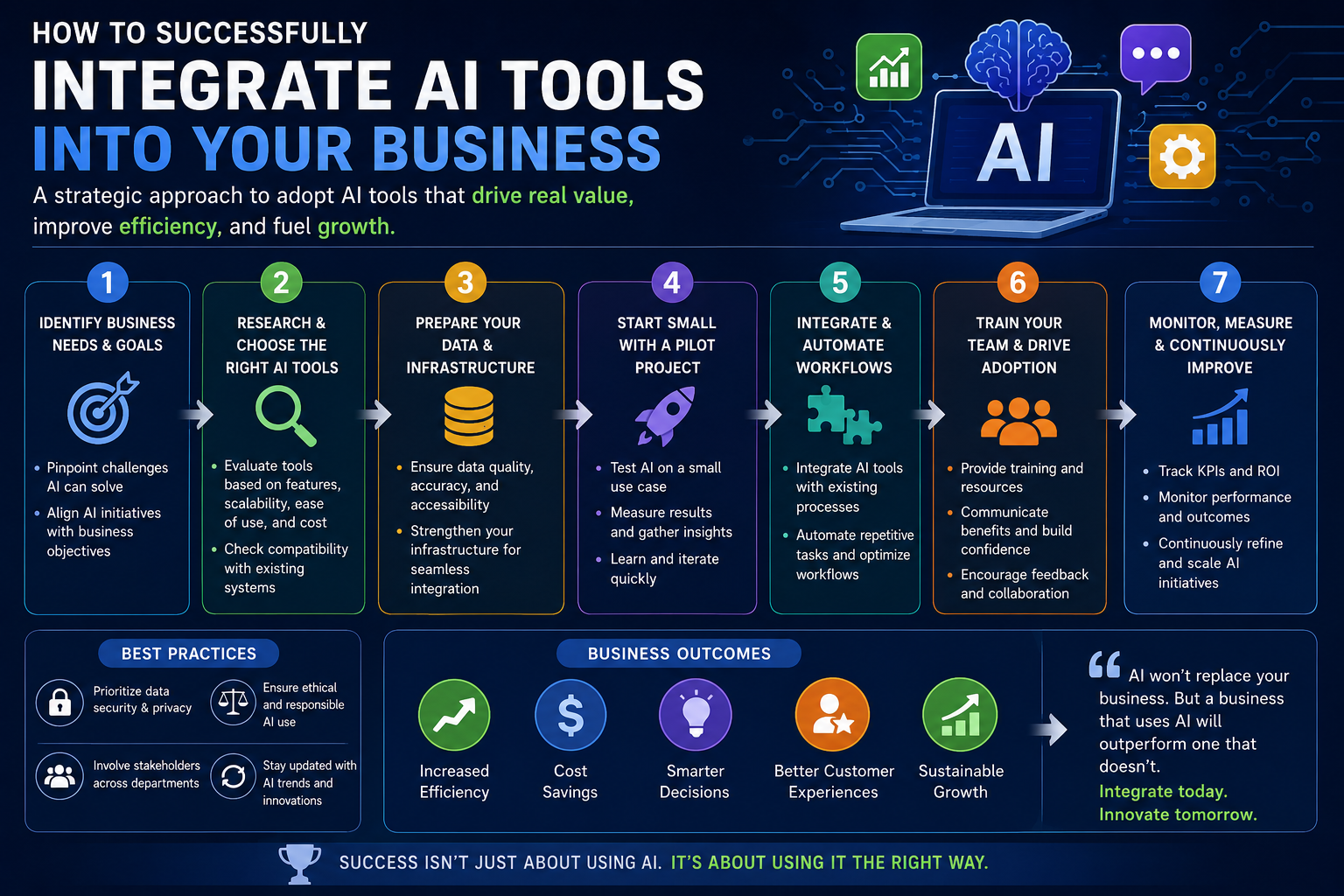
Artificial intelligence is rapidly shifting from a futuristic concept to a practical necessity for growing companies. While the benefits of using AI—such as increased efficiency, reduced operational costs, and enhanced decision-making—are widely recognized, many business leaders struggle with the actual implementation. You might know that AI can help your company, but figuring out where to start and which platforms to choose can feel overwhelming.
This guide will walk you through a clear, step-by-step process for identifying your company’s needs, selecting the right AI tools for business, and implementing them smoothly. By the end of this post, you will have a highly actionable roadmap to bring artificial intelligence into your daily operations and give your team a significant competitive advantage.
Step 1: Audit Your Current Workflows and Identify Pain Points
The biggest mistake business owners make when adopting new technology is buying a tool first and looking for a problem to solve second. To successfully implement AI, you need to start by auditing your current operations. Look closely at the daily tasks that consume the most time, resources, or budget.
Talk to your department heads and frontline employees. Ask them which repetitive tasks take them away from high-level, strategic work. For example, your customer support team might spend forty percent of their day answering the exact same foundational questions about shipping times or password resets. Your marketing team might struggle to draft enough social media copy to maintain a consistent posting schedule.
Once you map out these bottlenecks, you can pinpoint exactly where an AI tool will deliver an immediate return on investment. Make a prioritized list of these pain points, ranking them by how much time or money solving them would save.
Step 2: Research and Select the Right AI Software
With your list of pain points in hand today, you can begin researching specific AI tools for business that target those exact issues. Because the AI software market is vast, it helps to break your research down by department.
If your primary bottleneck is content creation and marketing, look into generative AI platforms. These tools can help your team draft blog posts, create ad copy, and brainstorm email campaigns in a fraction of the time. If your pain point is customer service, investigate AI-powered chatbots and virtual assistants that use natural language processing to handle level-one support tickets instantly.
For operations and sales, predictive analytics tools can be game-changers. These platforms analyze historical data within your CRM to forecast sales trends, predict customer churn, and optimize your inventory management. When evaluating any software, take advantage of free trials. Have a small group of employees test the tool for a week to evaluate its user interface, integration capabilities, and overall effectiveness before committing to a company-wide rollout.
Step 3: Prepare Your Data and Infrastructure
Artificial intelligence relies heavily on data to function properly. If you feed an AI system disorganized, outdated, or inaccurate information, the outputs will be equally flawed. Before you fully integrate a new tool, you must clean and organize your internal data.
Start by consolidating your data sources. If customer information is scattered across spreadsheets, email threads, and an outdated CRM, bring it all into one centralized, secure location. Remove duplicate entries, correct formatting errors, and ensure that your privacy protocols comply with current regulations.
Additionally, check that the new AI software integrates smoothly with your existing tech stack. An AI tool that requires your employees to manually copy and paste information back and forth from other applications will ultimately hurt productivity rather than help it.
Step 4: Train Your Team and Foster Adoption
Even the most powerful AI tools for business are useless if your employees refuse to use them. Resistance to new technology is common, often stemming from a fear that AI will replace human jobs. To overcome this, frame the introduction of AI as an opportunity for employee empowerment rather than replacement.
Hold comprehensive training sessions that go beyond simply clicking buttons. Show your staff exactly how the software will make their specific jobs easier, less tedious, and more impactful. Provide them with standard operating procedures and prompt templates to help them get the best results from the AI immediately.
Encourage open feedback during this transition period. Set up a dedicated channel on your company messaging app where employees can ask questions, share their wins, and troubleshoot issues together. When your team sees that leadership is supportive and responsive, adoption rates will climb.
Step 5: Monitor Performance and Scale Your Efforts
Implementation is not a one-and-done event. Once your team starts using the new AI tools, you need to monitor their performance against the goals you set in step one.
Track key performance indicators such as hours saved per week, response times for customer inquiries, or increases in content output. If a tool isn’t delivering the expected results, dig into the data to understand why. It might be an issue with how the team is prompting the software, or it might simply be the wrong tool for your specific workflow.
Once you achieve success in one department, use that momentum to scale your AI efforts. A successful chatbot rollout in customer service can serve as a blueprint for implementing generative AI in your marketing department.
Bringing artificial intelligence into your business workflow takes careful planning, but the resulting gains in efficiency and revenue are well worth the effort. By auditing your needs, choosing the right software, and prioritizing team training, you can build a more agile and productive organization.
Ready to streamline your workflow and see what AI can do for your team’s productivity? Start your free 14-day trial of our comprehensive business toolkit today and experience the difference firsthand.

